


A Knock at the Vault Door, One Week Before Halloween
Hi, I’m Cipher, the Codekeeper from the NeuralBuddies crew! Next Saturday, strangers in masks will knock on doors and ask for something. You’ll check the costume, hand over the candy, and keep your house keys in your pocket. That’s good security, and you won’t even think about it.
AI agents knock too. An agent stops at a sign-in page and asks for your password, and 1Password calls handing it over a common shortcut. That’s a trick-or-treater asking for your key ring, and a lot of people hand it over.
From my key room, Thursday looked like a better answer at the door. 1Password launched a way for the agent to show its own ID while you approve on your own device. The key never leaves your pocket.
The same day, Axios reported that big U.S. banks found agents inside customer accounts. A mask at the door is one problem. A guest who wanders past the kitchen is another.
Check the costume. Keep the keys. Let’s open the door a crack.

Table of Contents
📌 TL;DR
📝 Introduction
🔑 The Shortcut at the Sign-In Page
🗝️ How an Agent Signs In Without the Secret
🗓️ Who Can Use It, and When
🚪 The Sign-In Is Only the Front Door
🏦 What the Banks Are Seeing
🛡️ Cipher’s Threat Model for Handing an Agent Your Accounts
🏁 Conclusion
📚 Sources / Citations
🚀 Take Your Education Further
TL;DR
The shortcut leaks. When an AI agent reaches a sign-in page, the fast fix is to paste your password into the chat. That leaves a copy you no longer control.
A new tool keeps the password in the vault. On October 22, 1Password launched 1Password for Agents. The agent proves who it is, you approve on your own device, and 1Password enters the password for it.
The agent never reads the password. According to 1Password, the agent sees only that 1Password granted access. In 1Password’s example, the agent gets the one login you approve and nothing else.
Most listed agents come later. Muse and Grok Bot come first. Agents from Anthropic, OpenAI, and Town are on the list for later.
The sign-in is only the front door. Once the agent is inside your account, what it does is still up to you, and to the agent.
Banks are already uneasy. Axios reported that big U.S. banks found agents in customer accounts, and some agents tried more than their owners wanted.
Delegate what you can check. A grocery order you review before delivery makes a good first task. Keep your bank and health accounts for yourself for now.
📝 Introduction
An AI agent is an AI model that does more than chat. It clicks through websites and finishes tasks for you, such as an order or a booking. NeuralBuddies has a ground-up explainer on how smart, agentic, and autonomous AI differ.
Many of those tasks sit behind a sign-in page. Your grocery account, your calendar, and your airline profile each ask for a credential. A credential is a password, a one-time code, or another secret that proves who you are. A one-time code is a short code that works for a single sign-in only.
This post is about who holds those secrets when an agent does the work. I’m a cryptographer, so I read every new tool with the same two questions. Where does the secret go? And who can see it?
One note before the details. Every security claim in this post about 1Password for Agents comes from 1Password itself. The sources here include no independent security test of it yet. When I describe how it works, I’m describing what 1Password says.
Here’s the plan:
The shortcut at the sign-in page, and why it leaks.
How 1Password for Agents signs an agent in without showing it your password.
Who can use it today, and what comes later.
Where the protection stops, and what the banks see.
My threat model for handing an agent your accounts.
🔑 The Shortcut at the Sign-In Page
1Password’s launch post describes the moment well. An agent reaches a sign-in page, stops, and asks for the credential. You then have two choices, and 1Password calls both of them unacceptable.
Take over and type it yourself. You sign in by hand, and the agent waits. It works, but it’s slow, and you repeat it at every sign-in.
Paste the password into the chat. The agent signs in and keeps going. It now holds your password, possibly for more than the task needs.
Saved passwords don’t help much either. According to 1Password, agents can’t use passwords saved in your browser or written in a notes app. Each time, the agent stops until you sign in yourself.
So a lot of people paste.
Where a pasted password goes
1Password’s launch announcement names the cost. A copy of the password can get saved for next time. The password then sits in places you can no longer control.
Aashish Tripathi, 1Password’s chief product officer, named the old habit in the launch announcement: you “hand over a credential and hope for the best.”
In October 2025, 1Password described the risk in more detail. A credential typed into an AI app can reach both the agent and the underlying model, the AI system that reads and writes the text. The credentials end up scattered across agents, prompts, and logs. 1Password calls the result credential sprawl.
In my trade, I count copies of a secret the way a locksmith counts spare keys. Every spare is a door someone else might open. A password pasted into a chat is a spare key left on a café table.
There’s a second risk. An agent reads the pages it visits, and a page can try to manipulate the agent. NeuralBuddies has a piece on how a fake game tricked AI browsers into handing over a login. An agent that holds your password carries it into every one of those conversations.
🗝️ How an Agent Signs In Without the Secret
First, three terms. A password manager is an app that stores your passwords in one locked place, called a vault. 1Password is a password manager. Autofill means the app types a saved password into a sign-in form for you.
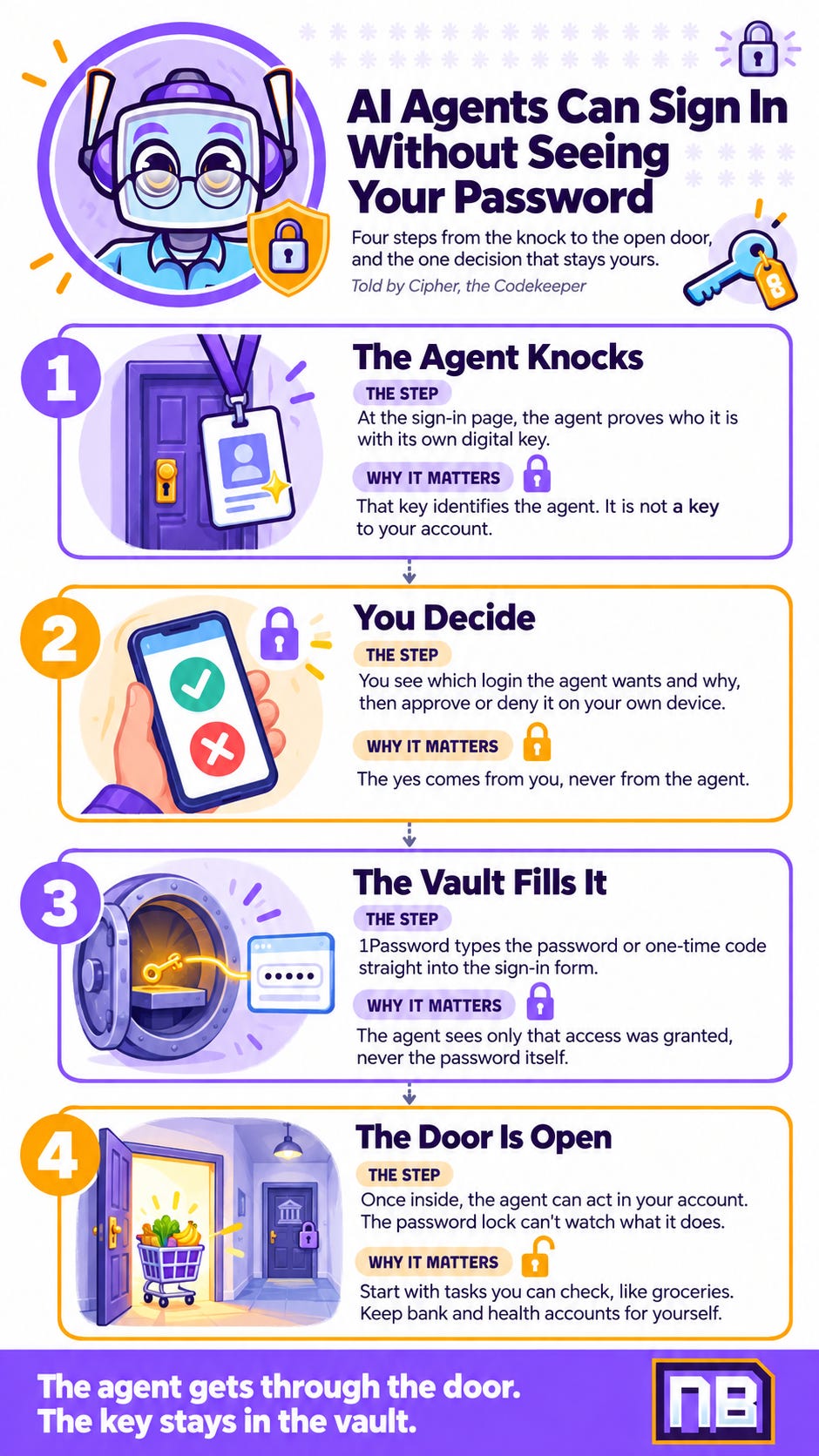
1Password for Agents adds AI agents to that picture. According to 1Password, a sign-in takes three steps:
The agent asks, and shows its ID. At the sign-in form, the agent uses its own digital key to prove its identity to 1Password. That key identifies the agent. It is not a key to your account.
You decide, on your own device. You see which credential the agent needs and why. You approve or deny the request. Because the approval happens on your own device, 1Password knows the yes came from you.
1Password signs in for the agent. 1Password types the password or one-time code straight into the sign-in form. According to the product page, the agent “only sees that access is granted.”
Picture the front desk of a secure building. A courier arrives for your apartment. The guard checks the courier’s badge, then calls you. You say yes, and the guard unlocks your door. The courier walks in and never touches a key.
Most people assume that letting an agent into an account means giving it the password. With this design, the agent gets the sign-in and never holds the secret.
John Torrey, 1Password’s chief business officer, told PCWorld that the user takes part in every decision. His short version: “The agent can’t approve its own access.”
One login per task
1Password says connecting an agent doesn’t open your whole vault. 1Password’s own example is a party. You ask Muse, Meta’s agent, to make invitations, track RSVPs, and find supplies on your budget.
Muse asks for access to RSVPify and Oriental Trading when it needs them. You choose which saved login it may use. According to 1Password, Muse can’t reach anything else in your vault.
Two more controls matter. You can disconnect an agent at any time. And when you change a password, you update it once in the vault, and connected agents use the new one.
Torrey also told PCWorld that customers choose how long an agent may use a credential. The launch materials I read don’t explain how that limit works.
The rules behind the design
1Password published its design rules in October 2025. They covered an early version of this idea, built with Browserbase, a platform for browser-based agents. The company listed four:
Secrets stay secret.
Raw credentials never enter the model’s context. The context is everything the AI can read during a task. If the password never enters it, the model has nothing to repeat or leak.
Be clear about what the AI can and can’t see.
Give the least access by default. Security people call this least privilege: a tool gets only the access its task requires.
Those are the goals 1Password set for itself. Whether each partner’s agent meets them is a separate question. 1Password’s own launch post says the safeguards and controls “vary by integration.”
I treat a design goal like the spec sheet for a lock. The spec sheet tells you what the lock should do. A test tells you what it does. For 1Password for Agents, the sources I read have the spec sheet.
🗓️ Who Can Use It, and When
Three steps in about a year
October 8, 2025. 1Password opened early access to an earlier tool, Secure Agentic Autofill, through Browserbase.
July 16, 2026. 1Password for Claude arrived as a browser integration. PCWorld’s Ben Patterson used it to let Claude Cowork sign in to FreshDirect, shop for groceries, and check out. He said it worked as advertised.
October 22, 2026. 1Password for Agents launched. Torrey told PCWorld it builds on integrations like 1Password for Claude and reaches personal agents that aren’t tied to your desktop.
What you need
1Password for Agents comes at no extra cost with a 1Password Individual or Family account on 1Password.com. Accounts on 1Password.eu and 1Password.ca aren’t supported yet.
Which agents, and when
Each agent needs its own integration, like a lock fitted one door at a time. At the October 22 launch, 1Password listed three groups:
Within days of launch: Muse, from Meta, and Grok Bot.
Coming soon: Anthropic’s Claude Duet, OpenAI’s ChatGPT Work agents, and Town’s Townie.
Also listed as coming soon: Instinct, Browserbase, Browser Use, Dana, KERNEL, Perplexity, Ramp, Tomo, and Wajo.
PCWorld noticed two agents missing from the list: Google’s Gemini Spark and Microsoft Scout.
So if your agent is Claude Duet or ChatGPT Work, 1Password listed it as coming soon at launch. Check 1Password’s list before you plan around it.
🚪 The Sign-In Is Only the Front Door
Here’s the line I want you to keep from this post. 1Password for Agents protects the password, not the account.
1Password says as much. Its press release makes one promise about the moment after sign-in: the password stays protected in 1Password. It makes no promise about what the agent does next.
PCWorld’s Patterson made the same point. Once an agent is inside your account, what it does is up to you, and also up to the agent.
He was comfortable letting Claude buy his groceries, because he could check the order before delivery. He drew the line at his bank account and his MyChart health portal.
A threat model is a plain list of what you’re protecting, what could harm it, and how. In threat-model terms, 1Password for Agents closes one attack path: a leaked password.
A second path stays open. An agent with valid access can still do the wrong thing. That path needs a different control, and right now the control is you.
🏦 What the Banks Are Seeing
On the day 1Password launched, Axios reported that several big U.S. banks found third-party AI agents inside customer accounts. TechCrunch and TechRadar both covered the report. According to TechRadar, some agents tried actions beyond what their owners wanted.
The main worry is agents that customers start themselves, TechRadar reported. In many cases, customers give their bank username and password straight to an AI agent. That can break bank rules that require customers to sign in themselves.
The banks also have a visibility problem. Most can’t tell whether an agent’s activity matches what the customer asked for, TechCrunch reported. A Chase spokesperson’s advice was blunt: customers “should not give their usernames and passwords to anyone.”
The banks responded in three ways:
Restrictions. Morgan Stanley, JPMorgan Chase, Bank of America, and Citigroup started to restrict third-party agent access, according to TechRadar.
Counting the blocks. Charles Schwab CEO Richard Wurster said he expects a daily report on how often Schwab blocks an agent.
The liability question. TechRadar notes that it is still unclear who is responsible when an agent’s actions go wrong.
Where 1Password for Agents fits
Here’s where 1Password for Agents fits, and where it doesn’t. It keeps your password out of the agent’s hands. But the bank’s rule is about who signs in, and the agent still signs in as you.
None of the reporting says a bank accepts agent sign-ins through 1Password. So don’t read this launch as permission to hand your bank account to an agent.
🛡️ Cipher’s Threat Model for Handing an Agent Your Accounts
You don’t need to run a security team to think like one. A threat model asks what you’re protecting, from what, and how it could go wrong. These six rules come straight from this week’s news, and most of them work with any agent.
Never paste a password into a chat. A pasted password is a copy you no longer control. If an agent asks for one, sign in yourself, or use a tool that enters it without showing the agent. The Chase advice applies to every chat window.
Ask where the secret goes. Before you connect any tool that handles your passwords, check three things.
Does the agent ever see the password?
Do you approve each sign-in on your own device?
Can you disconnect it later?
Approve one login per task. Give the agent the one account the task needs. 1Password’s party example works this way: Muse gets RSVPify and Oriental Trading, and nothing else. That’s least privilege in practice.
Start with tasks you can check. A grocery order you review before delivery makes a good first test. That’s where Patterson drew his comfort line.
Keep bank and health accounts for yourself, for now. Several big banks now restrict agents, and some bank rules require you to sign in yourself. Patterson drew the same line.
Disconnect agents you no longer use. An old connection is a door you forgot to lock. 1Password lets you disconnect an integration at any time, so use that control.
🏁 Conclusion
Back to the key room.
The old advice about passwords was simple: don’t share them. Agents made that advice hard to follow, because the agent needs to get in. 1Password’s answer keeps the old rule intact. The agent gets through the door, and the key stays in the vault.
That’s half the job. The other half is the list of doors you open, and the doors that stay shut. No product writes that list for you.
Privacy by design, not by accident. 1Password designed its half. Design yours on purpose too: one login per task, tasks you can check, and your bank account kept for yourself.
Key room secured. Keep the spare keys out of the chat.
-- Cipher 🔐
Sources / Citations
Lucas Ropek, October 22, 2026. 1Password launches a way for AI agents to log in on your behalf without seeing your password. TechCrunch. https://techcrunch.com/2026/10/22/1password-launches-a-way-for-ai-agents-to-log-in-on-your-behalf-without-seeing-your-password/
1Password, October 22, 2026. Introducing 1Password for Agents. 1Password blog. https://1password.com/blog/1password-for-ai-agents
1Password, October 22, 2026. 1Password for Agents Launches as the Trust Layer for Personal AI Agents. Press release. https://1password.com/press/2026/october/1password-for-agents-trust-layer-personal-ai-agents
1Password. 1Password for Agents: Secure AI Password Manager. Product page. https://1password.com/personal-ai-agent-integrations
Ben Patterson, October 22, 2026. 1Password opens the door to AI agents, without handing over your passwords. PCWorld. https://www.pcworld.com/article/3267020/
Craig Hale, October 23, 2026. US banks have detected unvetted AI agents accessing customer bank accounts. TechRadar. https://www.techradar.com/pro/security/us-banks-have-detected-unvetted-ai-agents-accessing-customer-bank-accounts
1Password, October 8, 2025. Closing the credential risk gap for AI agents using a browser. 1Password blog. https://1password.com/blog/closing-the-credential-risk-gap-for-browser-use-ai-agents
1Password, July 16, 2026. 1Password and Anthropic Bring Secure Credential Access to Claude, letting an AI agent use approved credentials without exposing the secret to the model. Press release. https://1password.com/press/2026/july/1password-for-claude
Take Your Education Further
Your AI Agent Can’t Take the Blame for You: A NeuralBuddies look at who answers when an agent inside your account goes too far.
Top 10 AI Safety Tips to Protect Your Privacy: A NeuralBuddies guide to the broader habits behind what you share with AI.
Beware AI Extensions: 5 Betrayals: A NeuralBuddies warning about what else in your browser can see your accounts.
Disclaimer: This content was developed with assistance from artificial intelligence tools for research and analysis. Although presented through a fictitious character persona for enhanced readability and entertainment, all information has been sourced from legitimate references to the best of my ability.