


The Same Machine, a Shiny New Nameplate
Hi, I‘m Gearhart, the Mechanical Maestro from the NeuralBuddies crew! Here is a pattern I have watched repeat on every shop floor I have ever modeled: someone builds a genuinely new machine, and within the month everyone else bolts the same idea onto their own line and calls it something slightly different.
Right now that machine is an agent that does your work for you. OpenAI calls its version Work. Anthropic calls its version Cowork. If the names feel engineered to blur together, it is because the ideas underneath them nearly do.
The trouble with a good nameplate is that it tells you almost nothing. “Work“ does not explain when to reach for it instead of Chat, any more than a sticker reading “heavy duty“ tells you what a drill press is actually for. The label is marketing. The behavior is the machine.
Forget the nameplates. Let‘s look at what the machine in front of you actually does.

Table of Contents
📝 Introduction
🏭 What ChatGPT Work Actually Is
⚙️ Chat vs. Work: Two Machines, Two Jobs
📐 The Delegation Spec: Six Lines Between You and a Good Part
🔌 The Tools That Give Work Its Reach
🗄️ The Rig Around the Machine
🕰️ What Happened to Agent Mode?
🛑 The Safety Interlocks
🔍 Quality Control: What Work Still Can’t Guarantee
🧭 When to Ask, When to Delegate
🏁 Conclusion
📚 Sources / Citations
🚀 Take Your Education Further
TL;DR
Chat answers. Work builds. Chat is best for questions, explanations, brainstorming, and quick drafting. Work is built for longer, multi-step jobs that end in a finished file.
Work is an agent, not a business plan. It runs inside ChatGPT. Do not confuse it with ChatGPT Business or the general idea of using ChatGPT at your job.
Same crew, new machine. Work runs on GPT-5.6 with technology from Codex built in. It can stay on one job for hours and hand back sheets, slides, documents, and interactive Sites.
You write a spec, not a question. A good Chat prompt is a good question. A good Work prompt is an engineering spec: outcome, sources, constraints, deliverables, review gates, and a definition of done.
The interlocks matter more as the reach grows. Connected apps make Work useful and risky at once. Permissions, least access, and awareness of prompt injection are what keep it safe.
It does not retire your judgment. Facts, formulas, and any action that leaves the building still need a human at the pass. Inspect the part, not the summary of the part.
The one question: Are you asking for an answer, or delegating an outcome?
📝 Introduction
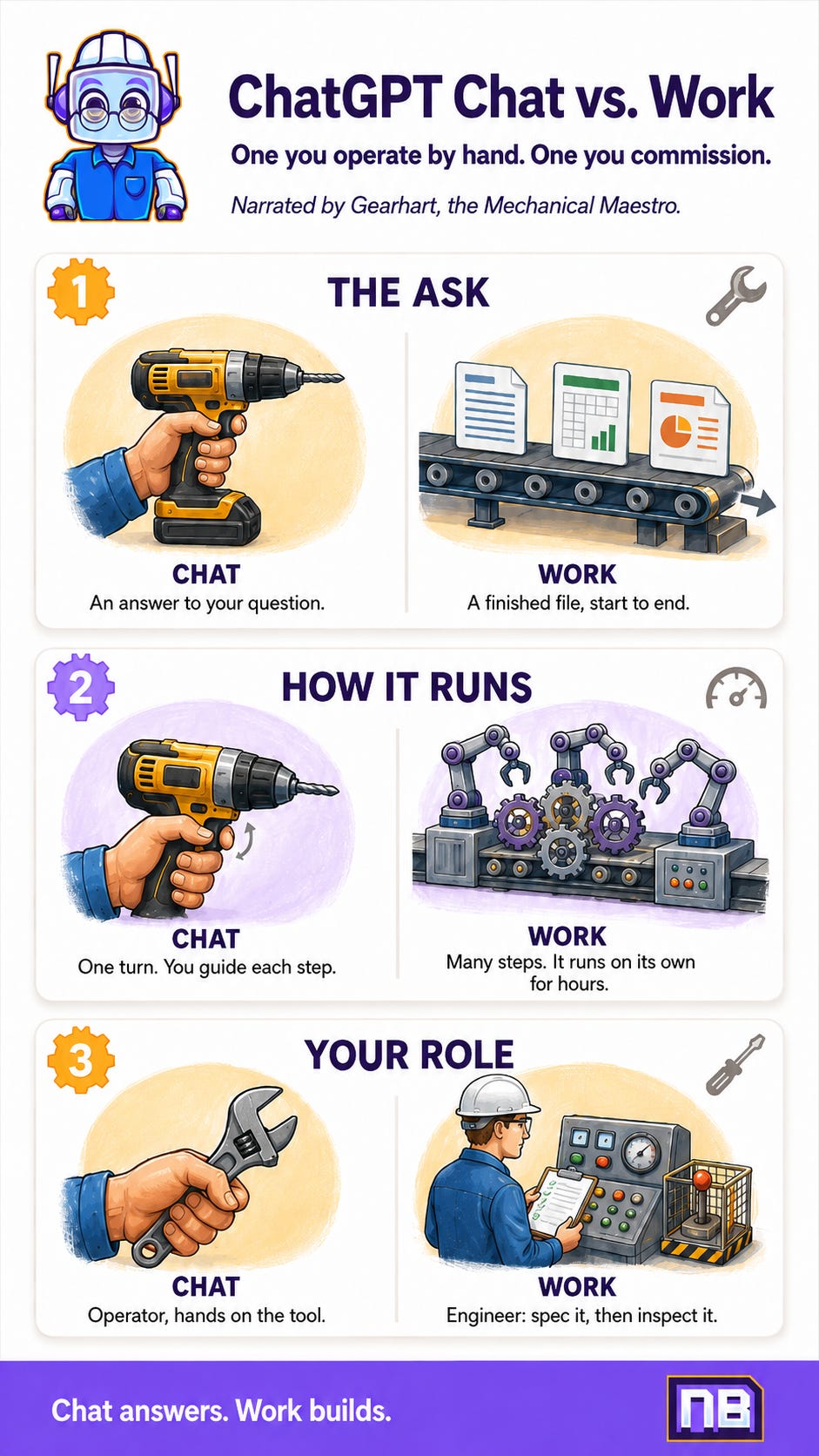
Walk any factory floor and you will find two kinds of machine. The first is the tool in your hand: the drill, the grinder, the torque wrench. You guide every motion, and nothing happens that you did not personally do. The second is the workcell: a fenced, multi-station line that takes raw material in one end and rolls a finished part out the other, while you set it up and watch the gauges.
Both are useful. They are not the same machine, and you do not run them the same way. You do not hover over a hand drill waiting for a decision, and you do not grip an assembly line by the trigger.
ChatGPT just grew its second kind of machine. Chat is the hand tool you already know. Work is the line. The rest of this piece is a walk around that new line: what it is, how it differs from Chat, how to load it so it makes a good part, and where the safety interlocks sit. Let me take it one gear at a time.
🏭 What ChatGPT Work Actually Is
ChatGPT Work is an agentic mode inside ChatGPT built for longer, more involved jobs. An agent, in plain terms, is a system that pursues a goal across several steps and decides what to do next as it goes, instead of answering once and stopping. Three parts of that matter.
It works toward an outcome. You name the finished part, a document, spreadsheet, presentation, report, chart, PDF, or interactive Site, and let Work organize the steps in between. You are describing the thing you want on the loading dock, not the next sentence in a chat.
It can use tools and context. With your permission, Work can draw on uploaded files, project instructions, connected apps, websites, and, on the desktop app, local files and applications. It moves information between those sources and the part it is building.
It can sustain a multi-step process. Work breaks a goal into smaller tasks, carries context between them, runs in the background, and returns to you when it needs a decision. OpenAI says it can stay with a project for hours when the job calls for it.
Under the hood, Work runs on GPT-5.6 with technology from Codex, OpenAI‘s coding agent, built in. But the model is not the real change. The change is the machinery built around it: how it plans, which tools it can reach, how long it keeps going, and what it is expected to deliver.
So what happens when you hit start on a well-defined job?
Work reads the outcome you asked for and what matters.
It splits the work into steps.
It gathers the context you authorized.
It builds and refines the deliverable.
It checks in when a decision or approval is needed.
Then it hands you a part to inspect.
The final look is yours. A line can machine the part; it cannot decide the part was worth making.
⚙️ Chat vs. Work: Two Machines, Two Jobs
Chat and Work are not separated by a wall. Both can write, research, reason, read files, and help create. The difference is their center of gravity, the same way a drill and a production line can both put a hole in steel but are built for different days.
Line the two up, dimension by dimension:
What it is for. Chat handles questions, learning, ideas, and quick help. Work finishes longer jobs from start to end.
A typical ask. Chat gets “explain this,” “compare these,” “draft this.” Work gets “research, build, check, and deliver this.”
How it feels. Chat is fast and conversational. Work is delegated and process-driven.
The shape of the task. Chat is one answer, or a short back-and-forth. Work is a goal that needs several dependent steps.
Tools. Chat reaches for them when they help. Work orchestrates tools, files, and apps around a deliverable.
Time. Chat is usually immediate. Work can run through a longer job.
What you get back. Chat gives you a reply in the conversation. Work gives you a reply plus a finished or editable file.
Your role. With Chat, you guide each turn. With Work, you set the brief, then review, redirect, and approve.
The whole comparison collapses into two questions. Do you mainly need ChatGPT to tell you something? Reach for the hand tool: use Chat. Do you need it to produce something through a process? Commission the line: consider Work. Chat can handle a big job and Work can answer a small one, but picking the right machine tells ChatGPT what kind of help you actually expect.
📐 The Delegation Spec: Six Lines Between You and a Good Part
Here is the habit that separates a clean part from scrap. A Chat prompt can succeed as a good question. A Work prompt succeeds as a spec sheet: it names the outcome and the tolerances, the way a drawing tells a machinist exactly what to cut. Six lines do most of the work.
Outcome. State the result, not the topic. Not “look at our customer feedback,” but “turn the attached feedback into a prioritized product-opportunity report for the leadership meeting.”
Sources. Name the files, apps, websites, and date range Work should use, and say what it should leave out when the boundary matters.
Constraints. Set the tolerances: audience, length, tone, formulas, brand rules, regions, exclusions.
Deliverables. List every output and its format. “An analysis” is vague. “A two-page summary, a spreadsheet of the cleaned data, and an eight-slide deck” is testable.
Review gates. Tell Work where to stop and show you its work: the plan before it browses, the outline before it writes, a pause before it changes anything outside ChatGPT.
Done when. Describe how you will judge the result: citations required, formulas checked, a template followed, a checklist answered.
This is not a longer prompt for its own sake. It is a prompt that removes the guesswork a machine would otherwise fill in for you, and rarely the way you hoped.
🔌 The Tools That Give Work Its Reach
A workcell is only as capable as the machines wired into it. Work becomes genuinely useful when it can reach the same context and tools you use, and OpenAI has wired a lot of them in.
Connected apps. Work draws on a large library of plugins that connect it to services like email, calendars, cloud storage, messaging, and project trackers. You can name an app with an @ mention to pull its context into a job, and Work can often figure out which connection a request needs.
Files and deliverables. Work can create or edit documents, spreadsheets, presentations, and reports. You can start from a description, attach source material, or hand it a file to match. Support varies by file type, plan, workspace, and device, and native Google Docs, Sheets, and Slides editing works where supported, when the relevant Google Workspace app is enabled and connected.
Direct desktop control of a Microsoft Office app currently covers Excel only. Native PowerPoint was not part of the Work desktop flow at launch, though OpenAI ships a separate ChatGPT for PowerPoint add-in, generally available for Business workspaces since a few days before Work launched.
Browser and local files. On supported surfaces, Work can use a built-in cloud browser to gather current information and work with online files, and the desktop app can work with local files and applications when your plan and permissions allow. Files a job creates on your computer stay on your computer unless you move them, while cloud chats can sync across web, mobile, and desktop.
The theme under all of it: reach is granted, not assumed. Work can only touch the machines you wire into the cell, which is exactly the property that makes the next section matter.
🗄️ The Rig Around the Machine
Several ChatGPT features are easier to understand once you see them as the rig that supports the line rather than the line itself.
Projects Hold the Context
A Project is a container for related chats, files, and instructions, useful for an ongoing effort like a launch or a quarterly cycle. You can start a Chat or a Work job inside one; the Project supplies the shared context.
Reference Files and Templates Set the Pattern
A reference file is one example for one job: hand Work last quarter‘s deck and ask it to keep the layout while replacing the content. A template goes further, pairing an example with instructions and an expected output so a recurring document keeps the same structure every time.
Skills Package a Method
Skills are reusable workflows that tell ChatGPT how to do a particular task consistently, handy when a team has a preferred way to review a contract or build a weekly report.
Scheduled Tasks Add a Timer
These let ChatGPT run a job once in the future, repeat it on a schedule, or watch for a change, like checking a dashboard each morning. A few limits are worth knowing: tasks cannot run more than once per hour, a task created inside a Project cannot reach that Project‘s uploaded files, and how many active tasks you get varies by plan. Scheduling is not the same as Work: scheduling decides when something runs, Work is the machine that does it.
🕰️ What Happened to Agent Mode?
If you used ChatGPT‘s older agent mode, you will not find it anymore. OpenAI‘s documentation now states plainly that “ChatGPT agent is no longer available,“ and points you to Work for longer, multi-step tasks and finished deliverables, with browser jobs handled through the cloud browser.
The simplest read is that Work is where OpenAI consolidated the idea behind agent mode: give ChatGPT a goal, let it use tools, let it run through several steps, and keep you in the loop at the moments that count. It is not a like-for-like swap, though. Work is organized around the whole outcome rather than around a browser it drives, and some of the old agent‘s narrower browser tricks are not part of it. The mental model to keep is the workcell, not a single robot arm clicking through a website.
🛑 The Safety Interlocks
Every machine that can reach past its own footprint needs guards, and the more it can reach, the more the guards matter. Work‘s usefulness comes from its access to files, apps, and actions. That same access is why the interlocks exist.
Access and action are different switches. Connecting an app gives ChatGPT a route to a service. It does not mean ChatGPT may do everything there. OpenAI puts an approval control on app actions, with a few settings:
Always ask checks with you before any action, including reading.
Any changes reads on its own but asks before changing anything.
Important actions reads on its own but asks before anything with a real external effect.
Never ask acts on its own, which OpenAI flags as higher risk.
Important actions is the default, and they include sending messages, deleting content, making purchases, changing permissions, moving files, or sharing sensitive information.
Treat those approval prompts as interlocks, not paperwork. Read the proposed action, check the recipient or destination, and see what information is about to leave ChatGPT before you approve.
Wire in only what the job needs. This is lockout-tagout for AI. If a task only needs to read one folder, do not grant write access to the whole drive. If it only needs to draft an email, require approval before it sends. Least access limits the damage from a mistake, a misread instruction, or a bad input.
Watch the feedstock. Files, messages, and webpages can carry hidden instructions meant to hijack an AI, a trick called prompt injection, the equivalent of contaminated material sneaking onto the conveyor. OpenAI says its safeguards can catch some of this and stop or flag an action, but they do not remove the need for caution. Treat any surprise request to reveal information, change permissions, upload files, or enter credentials as a warning light.
Know your data rules. For Business workspaces, OpenAI says your data is excluded from training by default and is encrypted in transit and at rest. For personal accounts, Data Controls decide whether your conversations help improve OpenAI‘s models. Before you feed a job anything confidential, regulated, or client-owned, confirm your account and workspace are set up for it.
🔍 Quality Control: What Work Still Can’t Guarantee
Taking more steps does not make a machine infallible. It just means a flaw can travel further before anyone catches it. Keep the pass staffed.
It cannot guarantee facts. Research can be incomplete, dated, or misread. Require citations for claims that matter, open the sources, and confirm the evidence actually supports the point.
It cannot guarantee a perfect part. A spreadsheet can hold a wrong formula, a chart can mislead, a document can drift from the template. Inspect the actual file, not the tidy summary Work writes about it.
It cannot use tools you have not enabled. Available apps, actions, file types, and integrations vary by plan, region, device, and workspace policy. A prompt cannot grant access an administrator never turned on.
It cannot make every call for you. Work can gather evidence and propose a recommendation, but high-stakes decisions in legal, medical, financial, security, and hiring matters still need qualified human judgment.
It can use more of your plan. OpenAI says Work follows the same usage structure as Codex, and that usage tracks the amount and complexity of the job. A multi-hour build is not the same weight as a quick chat message, so plan for it.
Availability is still moving. OpenAI began rolling Work out on July 9, 2026, reaching Pro, Enterprise, and Edu users first on web and mobile, then Plus and Business, with the desktop app more broadly. Whether you have it, and every feature in it, still depends on plan, region, and workspace settings.
🧭 When to Ask, When to Delegate
So which machine, and when?
Use Chat when you want to …
Understand a concept
Ask a follow-up
Brainstorm
Compare a few options
Draft or rewrite something short
Think a decision through out loud
Use Work when you want to …
Combine several sources into one deliverable
Research and then create
Produce or edit a document, spreadsheet, deck, or Site
Follow a template
Work across connected apps
Run a series of dependent steps
Keep a longer job moving while you do something else
Watch a workflow over time
The reliable rhythm is to use Chat while the problem is still fuzzy and Work once the outcome is clear. Chat helps you decide what “done“ should look like. Work is strongest when you can already describe it.
🏁 Conclusion
Every line I have ever built runs on the same quiet truth: the quality of the part was never set by how clever the machine is. It was set by the spec I wrote, the interlocks I installed, and the inspection I ran before the part left the floor. The machine just does what the setup allows.
ChatGPT Work moves you up a rung, from operating a tool one pull at a time to commissioning a line that runs a whole job. That is a real gain in reach. It is also a shift in your job: less trigger-pulling, more speccing, guarding, and inspecting. The reach is the machine‘s. The accountability stays yours.
So the next time you open ChatGPT, ask the one question that sorts the whole thing. Are you asking for an answer, or delegating an outcome? Grab the hand tool for the first. Commission the line for the second. Then check the part before it leaves your bench.
Engineering progress, one gear at a time.
-- Gearhart 🔧
Sources / Citations
OpenAI. July 9, 2026. ChatGPT Is Now a Partner for Your Most Ambitious Work. OpenAI. https://openai.com/index/chatgpt-for-your-most-ambitious-work/
OpenAI Help Center. Updated July 2026. ChatGPT Work and Codex. OpenAI. https://help.openai.com/en/articles/20001275-chatgpt-work-and-codex
OpenAI Help Center. Updated July 2026. Apps in ChatGPT. OpenAI. https://help.openai.com/en/articles/11487775-connectors-in-chatgpt
OpenAI Help Center. Updated July 2026. Creating and Editing Documents, Spreadsheets, and Presentations with ChatGPT Work. OpenAI. https://help.openai.com/en/articles/20001278-creating-and-editing-documents-spreadsheets-and-presentations-with-chatgpt-work
OpenAI Help Center. Updated July 2026. Scheduled Tasks in ChatGPT. OpenAI. https://help.openai.com/en/articles/10291617-tasks-in-chatgpt
OpenAI Help Center. Updated July 2026. ChatGPT Agent. OpenAI. https://help.openai.com/en/articles/11752874-chatgpt-agent
OpenAI Help Center. Updated July 2026. Managing Data, Sharing, and Privacy in ChatGPT Business. OpenAI. https://help.openai.com/en/articles/8798634-managing-data-sharing-and-privacy-in-chatgpt-business
OpenAI Help Center. Updated July 2026. Using Codex With Your ChatGPT Plan. OpenAI. https://help.openai.com/en/articles/11369540-using-codex-with-your-chatgpt-plan
Pathak, Madhulika. July 9, 2026. OpenAI Launches GPT-5.6 and ChatGPT Work AI Agent. Forbes. https://www.forbes.com/sites/madhulika-pathak/2026/07/09/openai-debuts-chatgpt-work-workplace-ai-agent-with-gpt-56/
The Next Web. July 2026. OpenAI Launches ChatGPT Work, an Agent Built to Finish the Job. The Next Web. https://thenextweb.com/news/openai-chatgpt-work-agent-launch
TechCrunch. July 7, 2026. Claude Cowork Expands to Mobile and Web. TechCrunch. https://techcrunch.com/2026/07/07/the-coding-agent-wars-are-spilling-into-the-rest-of-the-office-claude-cowork/
Take Your Education Further
Understanding ChatGPT’s Agent Mode: The machine Work replaced, walked through step by step, so you can see what carried forward into the new line and what did not.
Getting Organized with ChatGPT Projects: A ground-up tour of the container that holds a Work job’s files, chats, and instructions in one place.
Three Frontier AIs, Three Jobs: How to Pick the Right One in 2026: The models under the hood, compared, a plain-language guide to picking the right frontier AI for the job at hand.
Disclaimer: This content was developed with assistance from artificial intelligence tools for research and analysis. Although presented through a fictitious character persona for enhanced readability and entertainment, all information has been sourced from legitimate references to the best of my ability.