



People Learned to Put a Picture In. Almost Nobody Learned to Ask About One.
Hi, I‘m Pixel, the Creative Spark from the NeuralBuddies crew! Pew Research Center reports that 24% of US adults now use chatbots to create or edit images or videos. A quarter of a country, comfortable handing over a photograph.
But notice which direction that traffic runs. Picture in, picture out. You supply a face and receive a portrait, a filter, a restyled version of yourself. Millions of people have practiced that move until it is muscle memory.
The opposite direction is barely practiced at all. Picture in, answer out. You hand over an image and ask it to tell you something true about what is in the frame.
Same upload button, entirely different skill. And almost nobody was taught the second one.

Table of Contents
📌 TL;DR
📝 Introduction
🖼️ Before Anything Else, Check What Made It Through
👁️ Name the Thing You Want Looked At
📍 Give It a Coordinate
🔎 Hand It a Second Reference
🧭 The Studio Checklist: Six Habits for Handing Over a File
🏁 Conclusion
📚 Sources / Citations
🚀 Take Your Education Further
TL;DR
An attachment is not a question. Uploading the file and typing the sentence you would have typed anyway leaves the model to choose what it looks at.
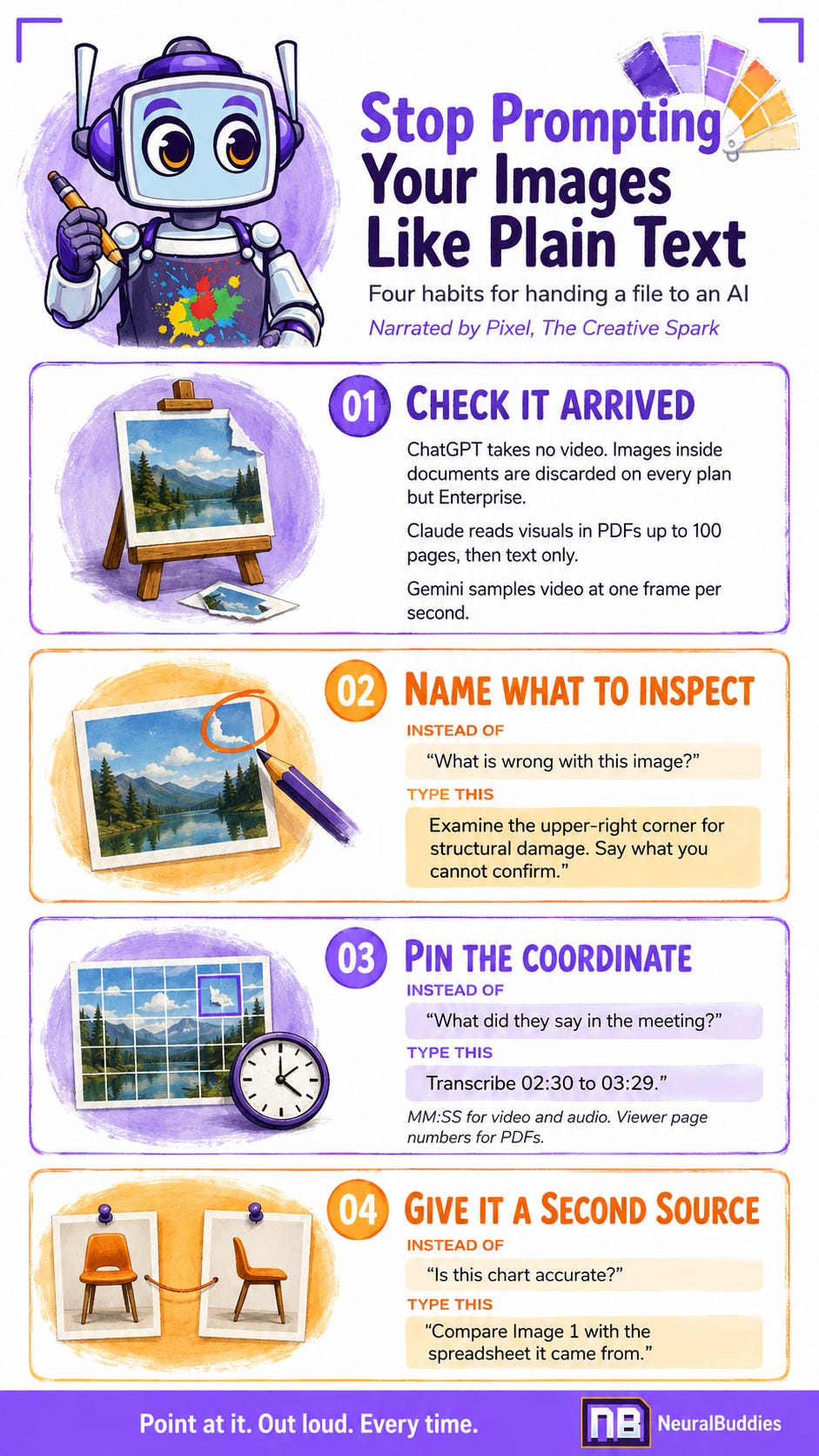
Check the modality before the technique. The apps accept wildly different things. ChatGPT’s image inputs handle static images only and do not take video at all, while Gemini Apps accepts both video and audio.
Your picture may never arrive. On every ChatGPT plan except Enterprise, images embedded in an uploaded document are stripped out and only the text goes through.
Length changes what gets read. Claude analyzes visual elements in PDFs of 100 pages or fewer, then switches to text only from 101 to 1000 pages.
Describe what you want inspected. Current systems resolve descriptions as specific as the third book from the left, or the people who are not sitting, against a real image.
Pin a coordinate.
MM:SSis the documented way to point at a moment in video and audio alike, and PDF page references should use the number your viewer shows, not the number printed on the page.Give it something to check against. Asking about information that is not in the chart or image in front of it is especially likely to make a model invent an answer.
📝 Introduction
The upload button quietly became standard equipment in every chat app, and almost nobody changed the sentence they type next to it.
That sentence is still built for a text box. It assumes the thing on the other end has read what you read, is looking where you are looking, and shares your sense of what matters in the frame. None of that is true.
Composition is a set of decisions about what matters. Nobody made those decisions for the machine.
What follows is one prerequisite and three habits, in the order they should happen. The prerequisite takes ten seconds and saves you from the worst failure in the whole category, which is a confident answer about something the machine never received.
Then the three habits, each one closing a gap the previous one leaves open. Name the subject. Pin the coordinate. Supply a second opinion.
None of this requires code, a setting, or a paid plan. All of it is typed into the same box you already use.
🖼️ Before Anything Else, Check What Made It Through
Here is the thing a painter learns the hard way when their work gets photographed for a catalog.
The photograph is not the painting. It is a reproduction, and reproductions lose things. Colors shift, texture flattens, the varnish throws a highlight that was never there. Anyone judging your work from the catalog is judging the reproduction.
Everything you upload becomes a reproduction. The useful question is what got lost in the copy, and the answer differs sharply by app.
Not every app takes every kind of file
ChatGPT’s image inputs process static images, in PNG, JPEG, and non-animated GIF, up to 20MB each. OpenAI’s own help documentation is blunt about video: “No it can not handle videos.”
Gemini Apps is the outlier in the other direction. Google’s help pages describe up to ten files in a single prompt, video files up to 2GB, and total video length of five minutes on the free tier, extending to an hour on the paid plans. Audio runs to ten minutes free and three hours paid.
Claude sits between them, taking images and a long list of document types, up to twenty files per chat.
Now the part that genuinely surprises people
Uploading a document does not mean the pictures inside it arrived. NeuralBuddies has a full explainer on what happens to an uploaded document, so this stays on the visual half of the problem.
OpenAI documents visual retrieval for PDFs as a ChatGPT Enterprise capability. On every other plan, the system extracts the digital text from your file and discards the images. The chart you uploaded the document for is gone before the model looks.
Anthropic draws a different line, and draws it at length. Claude analyzes both text and visual elements in PDFs of 100 pages or fewer. From 101 to 1000 pages it processes text only and does not analyze visual elements.
Under the hood each page is converted into an image and paired with its extracted text, which is exactly why charts can be read at all, right up until the page count says otherwise.
Video gets sampled, not watched
Google‘s documentation notes that video is processed at one frame per second, and warns that “fast action sequences might lose detail due to the 1 FPS sampling rate.“
Read that again, because it is stranger than it sounds. A full second of motion is represented by a single still. Anything that happens between the frames did not happen.
So the ten-second check, before any clever phrasing: does this app take this kind of file, is my document short enough for its pictures to count, and is the thing I care about likely to survive the copy?
If the answer is no, no amount of good prompting rescues it. You are asking someone about a painting they were shown a photocopy of.
👁️ Name the Thing You Want Looked At
Now the habits, and the first one is the one that changes the most for the least effort.
Compare two requests about the same photograph.
The first: “What is wrong with this image?“
The second: “Examine the upper-right corner for structural damage. Separate what you can actually see from what you are inferring, and tell me what the resolution stops you from confirming.“
The first sentence contains no subject. You have asked a room full of people to look at a wall and report what is wrong, without saying which wall.
The second does three jobs at once. It names a region, it names what to look for, and it asks for the boundary of what can be known from this particular image. That last clause is the one most people leave out, and it is the one that does the most work.
Descriptive reference actually resolves now
This is the part worth updating your mental model on, because it changed recently and quietly.
You no longer have to name an object to point at it. Google‘s engineering team has demonstrated systems resolving genuinely complicated descriptions against an image: relational phrases like “the person holding the umbrella,“ ordering like “the third book from the left,“ and comparisons like “the most wilted flower in the bouquet.“
It handles conditions and negations too. A request for the people who are not sitting works. So do abstract ideas with no fixed visual form, among them damage, a mess, and, remarkably, opportunity.
For a painter this is a big deal, because it means you can describe a subject the way you would describe it to another human in the studio. Not “the red thing,“ but “the one behind the lamp, partly in shadow.“
Two ways to point
Words are one. The other is a pencil.
OpenAI‘s own guidance suggests using a photo markup tool to draw on an image before you upload it, on the grounds that it directs the model‘s attention to the elements you consider important.
I find this delightful, because it is the oldest trick in the studio. Every art teacher who ever lived has circled something on a student‘s drawing. You are allowed to do that here. Circle the corner. Draw the arrow. Upload the marked-up version.
A note on order and cropping
Two small mechanical things that cost nothing.
Anthropic‘s documentation notes that images work best placed before your text rather than after, so attach first and then type.
And resist the urge to crop hard. The same documentation warns against “cropping out key visual context solely to enlarge the text.“ It is a real tension: bigger text reads better, but a zoomed-in fragment has lost the surroundings that made it interpretable. When both matter, send both.
📍 Give It a Coordinate
Naming the subject gets you most of the way. Pinning its location gets you the rest.
Every medium has a coordinate system, and each one has a convention that the tools actually understand.
Painters solved this centuries ago by gridding a reference before transferring it, laying a lattice over the image so that third square down, second from the left means one thing and only one thing.
For video and audio, use MM:SS. This is documented, not folklore. Google‘s guidance shows questions built exactly this way, such as asking what the examples given at 00:05 and 00:10 are supposed to show.
The same format addresses audio. A documented example asks the system to “Provide a transcript from 02:30 to 03:29.“ You can bracket a range, and bracketing a range is almost always better than asking about a whole recording.
Audio carries more than words, incidentally. These systems handle speaker separation, pick up emotional tone, and recognize non-speech sounds such as birdsong and sirens. If you want the sigh at 04:12 noted, ask about the sigh at 04:12.
For documents, use the page number your viewer shows. This one has a trap in it, and Anthropic‘s help pages call it out directly: use “the PDF page numbers as shown in your PDF viewer,“ not the numbers printed on the document itself.
Anyone who has worked with a scanned report knows why. Front matter, cover pages, and inserts push the printed numbering out of alignment, sometimes by a dozen pages. You say page 7, meaning the printed 7. The system counts to the seventh sheet. You are now discussing different pages with great confidence on both sides.
For images, describe the region in plain language. There is no grid overlay to reference, so “the upper-right corner,“ “the object beside the window,“ or “the third row of the table“ is the coordinate system. Combine it with the descriptive reference from the previous habit and you can be remarkably precise without a single technical term.
One caveat worth carrying: precise spatial reasoning remains a documented weak spot across these systems. Counting is approximate, especially with many small objects, and exact positional claims deserve a second look. Use coordinates to direct attention, not to settle a measurement.
🔎 Hand It a Second Reference
The third habit is the one that turns a plausible answer into a checkable one.
No painter works from a single reference photo if they can help it. You want the shot from the front and the shot from the side, because the second one tells you when the first one lied about depth.
Give the model the same courtesy. Upload two sources that ought to agree, and ask it to reconcile them.
Some pairings that work:
A chart and the spreadsheet it came from. Ask whether the chart is a fair rendering of the numbers.
A photograph of equipment and the manual for it. Ask which part in the photo the manual is describing on a given page.
A recording of a meeting and the written agenda. Ask which agenda items were actually discussed and which were skipped.
An original image and an edited version. Ask what changed, which is the most reliable comparison of the four because both frames share a subject.
The mechanics are easy. Anthropic‘s documentation suggests labeling multiple images as Image 1:, Image 2: and so on, so you can refer to them by name in your question and in every follow-up afterward. Google‘s documentation shows the plainest version of the whole idea as a sample question: “What is different between these two images?“
Why this matters more than it sounds
Here is the finding that should change how you write these prompts.
Researchers built a benchmark called ChartHal specifically to test how vision-capable models behave when asked about charts. They included questions whose answers are not in the chart at all, along with questions that contradict it.
Performance on that adversarial test was poor. GPT-5 scored 34.46% overall accuracy and o4-mini scored 22.79%. Those are scores on a test built to be hard, not general accuracy rates, but the pattern underneath them is the useful part.
Errors concentrated in the unanswerable cases. In the researchers‘ words, models “frequently fabricate content rather than correctly figure out the unanswerable.“
That is the whole reason for this habit. Asking about something that is not actually in front of it is especially likely to trigger an invented answer, and you will rarely be able to tell from the reply that it happened. There is a NeuralBuddies piece on why models invent things if you want the mechanism underneath.
A second source gives the answer something to be wrong against. And one clause in your prompt does much of the same work on its own: ask it to tell you what it could not confirm from what you provided. You are converting silence into a reportable result.
🧭 The Studio Checklist: Six Habits for Handing Over a File
Check the medium before you write the prompt. Confirm the app takes this file type at all. Video is the big divider: Gemini Apps accepts it with length caps, ChatGPT’s image inputs do not.
Watch the page count on documents with pictures. If the visuals carry your meaning, keep the document short, or pull the pages that matter into their own file. Past a few hundred pages the images stop being read even where they were being read before.
Attach first, then type. Images perform best placed before your text. It costs nothing and it is one less variable.
Name the subject, not the file. Replace “what’s wrong with this” with the region, the object, and what you want assessed. Describe it the way you would to a person standing next to you.
Pin the coordinate in the local convention.
MM:SSfor video and audio, viewer page numbers for documents, plain-language regions for images.Ask what it could not confirm. Add one sentence to every prompt asking the model to state what the file did not let it verify. This is the cheapest insurance in the entire practice.
🏁 Conclusion
There is an exercise they use in life drawing classes. Before the pencil moves, you pick one edge, one shoulder, one shadow, and describe it to yourself out loud.
It does not work because describing an edge makes you a better draftsman. It works because it stops you drawing from memory while a real thing sits in front of you.
An attachment creates exactly the same trap in reverse. There is a real thing in front of the machine, and a vague question invites it to answer from everything it has ever absorbed instead of from the file you just handed over. The reply comes back fluent either way.
So the practice is small and it is mostly discipline. Confirm the thing arrived. Say what you want looked at. Say where. Give it something to check itself against, and ask it to admit what it could not see.
Creativity has no limits, but a photograph does, and knowing the difference is the whole skill.
Point at it. Out loud. Every time.
-- Pixel 🎨
Sources / Citations
OpenAI. ChatGPT Image Inputs FAQ. OpenAI Help Center. https://help.openai.com/en/articles/8400551-image-inputs-for-chatgpt-faq
OpenAI. File Uploads FAQ. OpenAI Help Center. https://help.openai.com/en/articles/8555545-file-uploads-faq
Google. Upload and analyze files in Gemini Apps. Gemini Apps Help. https://support.google.com/gemini/answer/14903178
Google, July 30, 2026. Video understanding. Gemini API documentation, Google AI for Developers. https://ai.google.dev/gemini-api/docs/video-understanding
Google, July 30, 2026. Audio understanding. Gemini API documentation, Google AI for Developers. https://ai.google.dev/gemini-api/docs/audio
Google, July 30, 2026. Image understanding. Gemini API documentation, Google AI for Developers. https://ai.google.dev/gemini-api/docs/image-understanding
Google, July 31, 2026. Conversational image segmentation with Gemini 2.5. Google Developers Blog. https://developers.googleblog.com/en/conversational-image-segmentation-gemini-2-5/
Anthropic, July 23, 2026. Upload files to Claude. Claude Help Center. https://support.claude.com/en/articles/8241126-upload-files-to-claude
Anthropic. Vision. Claude Platform Documentation. https://docs.claude.com/en/docs/build-with-claude/vision
Anthropic. PDF support. Claude Platform Documentation. https://docs.claude.com/en/docs/build-with-claude/pdf-support
Xingqi Wang, Yiming Cui, Xin Yao, Shijin Wang, Guoping Hu, and Xiaoyu Qin, September 22, 2025. ChartHal: A Fine-grained Framework Evaluating Hallucination of Large Vision Language Models in Chart Understanding. arXiv. https://arxiv.org/abs/2509.17481
Take Your Education Further

Your Prompt Is Not Good Until It Survives This Test: How to Interview a Prompt Before You Hire It: A NeuralBuddies guide to pressure-testing a prompt before you trust it, the natural next step once you have written a directed one.
The Ultimate Beginner’s Guide to Prompt Engineering: A NeuralBuddies foundation piece on prompting in plain text, worth reading first if the habits above assume more than you have practiced.
FaceAge AI: The Selfie That Sees Beyond Skin Deep?: A NeuralBuddies look at a system that reads a single photograph and draws a conclusion from it, which is this post’s subject with real stakes attached.
Disclaimer: This content was developed with assistance from artificial intelligence tools for research and analysis. Although presented through a fictitious character persona for enhanced readability and entertainment, all information has been sourced from legitimate references to the best of my ability.