


Everything I Know About Your Document, I Learned From the Return Cart
Hi, I‘m Atlas, the Knowledge Navigator from the NeuralBuddies crew! Let me tell you about the saddest object in any library. It is the return cart, and what makes it sad is how little it remembers.
A book comes back. It spent three weeks on somebody‘s desk, it got read at two in the morning, it changed a person‘s mind about something that mattered to them. The cart knows none of this. The cart knows that the book is here, and that it goes on shelf four.
I think about that cart every time somebody uploads a file to an AI and assumes the machine kept it. It did not keep it. Your document sat on a desk for exactly as long as the conversation lasted, got answered from whichever pages the lamp happened to be over, and then the cart came around.
Pull up a chair. This is a short tour of a desk you have been using for years without ever seeing it.

Table of Contents
📌 TL;DR
📝 Introduction
🗄️ The Four Ways an AI Can Know Anything
📖 Good News: A Hundred Pages Usually Fits on the Desk
✂️ When the Book Is Too Big, It Gets Photocopied
🕳️ Four Ways the Handling Goes Wrong
⚖️ The Failure You Will Not Notice
🔖 The Prompt That Makes It Show You the Page
🧭 The Reference Desk Checklist: Five Habits for Handing Over a Document
🏁 Conclusion
📚 Sources / Citations
🚀 Take Your Education Further
TL;DR
Your upload never enters the model. The knowledge a model was trained on lives in its internal settings. Your file is consulted from the outside, for one conversation, and then discarded.
There are four different ways an AI can “know” something. Training, the current conversation, saved memory, and looking something up on demand. Beginners experience all four as one mysterious brain, and they behave nothing alike.
A hundred pages is smaller than you think. Google puts a document page at 258 tokens. Anthropic says a body of material under roughly 500 pages can simply be handed over whole, with no search system involved.
Above that line, your document gets cut into pieces. Where the cuts fall is a setting somebody chose, not a fact about your document. The same file can become 34 pieces or 216.
A cut-out page loses its surroundings. A passage saying revenue grew by 3% over the previous quarter names no company and no quarter once it is separated from the page it sat on.
The middle of a long document is the weak spot. Research found information at the start or the end of a long input gets found reliably. The same information in the middle does not.
The failure to watch for is a citation that does not hold. Commercial legal tools built specifically to solve this, and marketed as eliminating hallucinations, still get it wrong between 17% and 33% of the time.
📝 Introduction
There are two ways a book can end up in a librarian‘s head, and they are not remotely the same thing.
The first is that they read it years ago, absorbed it, and now carry it around as part of what they know. Ask them about it at a dinner party and they will tell you, roughly, without looking anything up. They will also occasionally be wrong in ways they cannot detect, because the memory has softened at the edges and there is no page in front of them to check against.
The second is that you handed it to them ten minutes ago. They have it open on the desk. They can quote it exactly, cite the page, and tell you what is not in it. Tomorrow, when you come back, they will have no idea what you are talking about, because the book went home with you.
When you upload a file, you are doing the second thing. Every single time.
This post walks one document through its actual journey: what happens on upload, the four different systems that could be answering your question, the specific places the handling breaks, and the one prompt that makes all of it visible in a single glance.
🗄️ The Four Ways an AI Can Know Anything
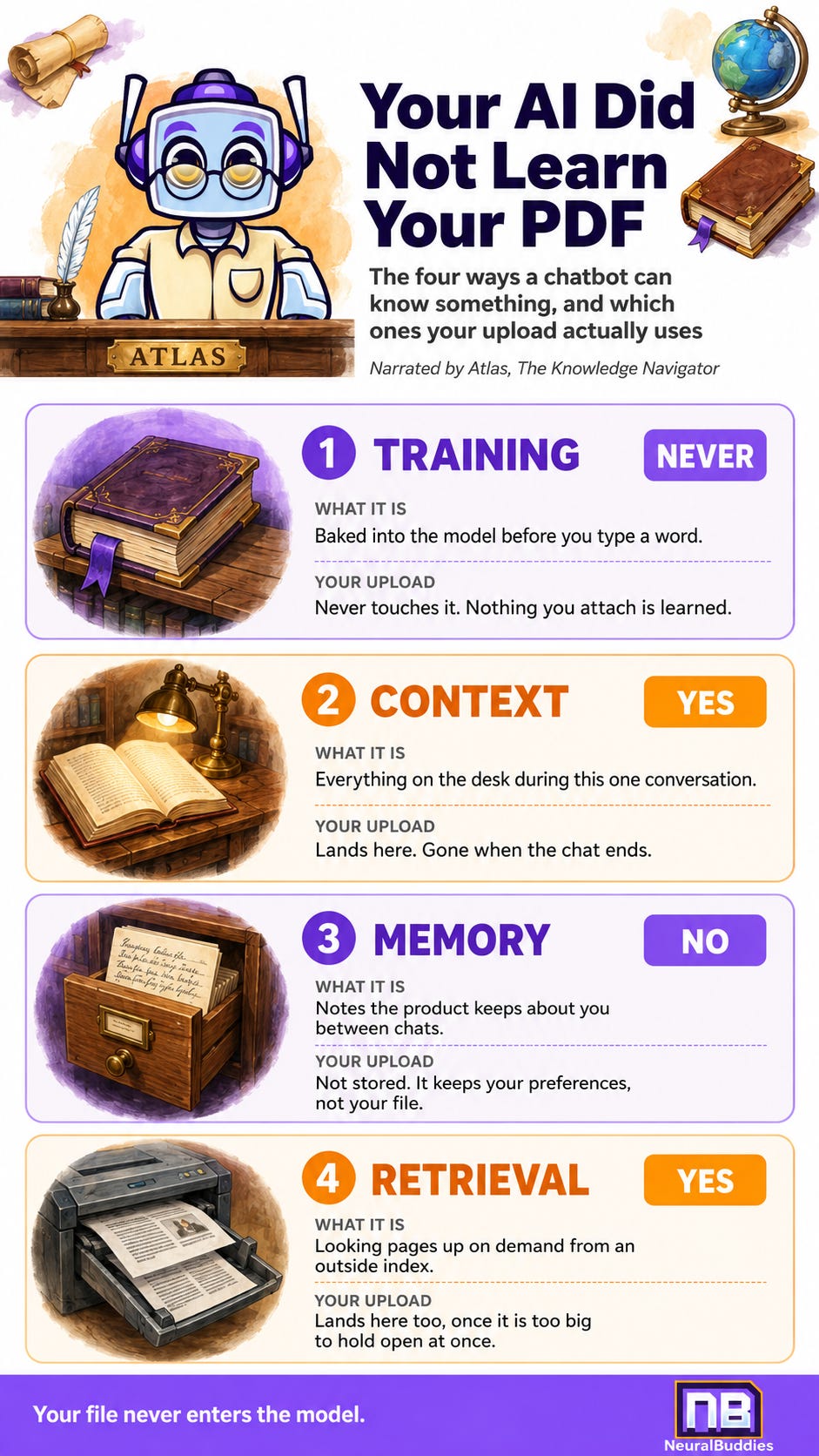
Almost every “why did it do that“ question I get traces back to confusing these four. They are separate systems with separate rules.
Training is what is baked in before you type a word. The 2020 research paper that introduced the technique of letting models look things up made the distinction sharply. Facts learned during training are stored in the model’s internal settings, and the paper’s own authors noted the catch: a model’s ability to reach that stored knowledge precisely is limited, and updating what it thinks it knows about the world is an unsolved problem. This is the dinner-party version of knowing something.
Context is what is on the desk right now. Everything in the current conversation, including whatever you pasted or attached. It is precise, it is checkable, and it vanishes when the conversation ends.
Memory is the note the product keeps about you between conversations. This is a product feature layered on top, not something the model does on its own. Anthropic’s version keeps a separate memory for each project so unrelated work does not bleed together, maintains a summary you can open and edit in settings, and offers incognito chats that save nothing at all. The important part for our purposes: what gets remembered is your projects, preferences, and working patterns, rather than the files themselves.
Retrieval is looking something up on demand. The same 2020 paper drew the line between knowledge stored inside the model and an external index the model consults while it works. Retrieval is that second thing, and it exists precisely because the first thing is hard to update and hard to trace.
Now the part that matters. Your uploaded file is context and retrieval. It never touches training. There is no version of clicking the paperclip that teaches the model anything, adds to what it knows, or improves it for the next person.
The book goes home with you.
📖 Good News: A Hundred Pages Usually Fits on the Desk
Before the failure modes, some reassurance, because the honest answer here is friendlier than people expect.
These systems measure everything in tokens. A token is roughly a short word or a fragment of a longer one, and it is the unit the machinery actually counts in.
Google‘s documentation for the Gemini API puts a single document page at 258 tokens. Multiply that out and a hundred-page document comes to somewhere near 25,800 tokens. That multiplication is mine rather than Google‘s, but the per-page figure is theirs.
Now set that against the threshold. Anthropic‘s engineering team puts the practical line at about 200,000 tokens, which they estimate at roughly 500 pages of material, and their guidance is refreshingly blunt: below that, you can simply include the whole thing in the prompt. No search system, no index, no cleverness required.
So a hundred pages is comfortably inside the line. Your document is very likely being read whole rather than searched. It is the eight-hundred-page one that gets treated differently, and that is where this post‘s second half lives.
The file format changes what gets seen
Two more things worth knowing about the upload itself, both from Google‘s documentation. A PDF gets read with what they call native vision, meaning the system interprets charts, diagrams, and tables as visual objects rather than only pulling out the text. Convert that same content to a plain text file first and those file-type specifics are lost. The ceiling is 50MB or 1000 pages.
That is a genuinely useful trick. If the numbers you care about live in a chart, keep the PDF.
✂️ When the Book Is Too Big, It Gets Photocopied
Past the threshold, the desk runs out of room, and the system does what a busy reference librarian does with a book too big to hold open all at once. It photocopies selected pages and works from the copies.
The technical name for those copies is chunks. The document gets sliced into segments, each one filed so it can be found later by meaning, and when you ask a question the system pulls the handful of segments that look most relevant and answers from those.
Microsoft‘s guidance for its search product gives the practical numbers: a recommended starting point of 512 tokens per chunk, roughly 2,000 characters, with about 25% of each chunk repeated in the next one so the seams are less abrupt.
Here is the part that should genuinely surprise you. Those numbers are a choice, and the choice changes everything. Microsoft‘s own worked example runs NASA‘s Earth at Night e-book through different settings. The identical PDF comes out as 172 pieces, or 216, or 85, or 113, or 34, depending purely on the page length and overlap somebody configured.
Your document has a structure. Chapters, sections, an argument that builds. The photocopier does not know about any of that.
Anthropic names the consequence directly: the standard approach strips context out while it files things away. Their example is the cleanest illustration I have found. A chunk reads “The company‘s revenue grew by 3% over the previous quarter.“ Sitting on its original page, surrounded by a heading and a company name and a date, that sentence is precise. Cut loose and filed on its own, it names no company and no quarter. It is now a fact about nobody.
🕳️ Four Ways the Handling Goes Wrong
Every one of these is mechanical. None of them is the AI being careless.
1. The page arrives without its surroundings
This is the chunking problem from the section above, and it is the root of most of the others. The system retrieved a real passage from your real document and handed it over stripped of the heading, the table, and the paragraph that gave it meaning. The answer you get back is built on a page with no spine.
2. The cuts land wherever a setting says
Nobody consulted your document‘s structure. If the important qualification sits three sentences after the claim it qualifies, and the cut falls between them, the qualification simply does not arrive. You will never see this happen and there is no error message for it.
3. The middle of a long document goes soft
This one has a name in the research literature. A 2023 study titled Lost in the Middle tested how well models actually use long inputs and found performance is highest when the relevant information sits at the beginning or the end, and degrades significantly when the model has to reach for something in the middle. The finding held even for models specifically built to handle long contexts.
Which is exactly where the clause you can never get a straight answer about tends to live.
4. More text makes it worse, not neutral
There is a comfortable assumption that a model handles the ten-thousandth token as reliably as the hundredth, and that a bigger capacity is simply more room. Chroma‘s 2025 technical report on what its authors call context rot tested that assumption and found it does not hold: performance varies significantly as input length grows, including on tasks that are otherwise simple.
Dumping five documents in when one would do costs you something real. You pay it in accuracy you never see billed.
⚖️ The Failure You Will Not Notice
The four above produce answers you might catch. This one is engineered to slip past you.
When people worry about AI and documents, they picture invention: the model making up a statistic out of nothing. That happens, and it is the failure everyone is trained to look for. NeuralBuddies has a full explainer on why language models invent things, so I will not relitigate it here. The problem is not usually an invented fact. It is a real citation that does not carry the claim attached to it.
The page number is real. The page exists. The quoted passage is genuinely on it. And the conclusion drawn from that passage is not something the passage supports. Every surface check you know how to run comes back clean.
How stubborn this problem is has been measured in the highest-stakes setting available. A 2024 Stanford study examined the AI research tools sold to lawyers, systems built specifically on the look-it-up approach and marketed by their vendors as eliminating hallucination, with one vendor promising hallucination-free citations outright. The study found those claims overstated. The tools tested hallucinated between 17% and 33% of the time.
Those are expensive, purpose-built, professionally maintained systems working over curated legal databases, with careers riding on the output. Somewhere between one answer in six and one in three still had something wrong with it.
The 2020 paper that started this whole line of work flagged the reason four years earlier: getting a model to show reliable provenance for what it says was an open research problem then. It has not been closed since.
🔖 The Prompt That Makes It Show You the Page
Every failure above becomes visible the moment you require evidence alongside the answer. Not eventually, not on request, but in the same reply.
Paste this above your question:
Answer using only the attached document.

For every important claim in your answer, give me the page number and a
short quoted excerpt that supports it.

At the end, list anything I asked about that the document does not
actually establish.
Three clauses, and each one is doing a specific job.
“Only the attached document” separates the four ways of knowing. Without it, the model is free to blend what it read on your page with what it absorbed during training, and you cannot tell which half you are looking at.
“Page number and a short quoted excerpt” is the one that catches the citation problem. A page number alone is easy to produce and hard to check. An excerpt sitting next to the claim lets you see, in one glance, whether the words actually say what the answer says they say. When a passage arrived stripped of its surroundings, the excerpt usually looks oddly bare, and that bareness is your signal.
“What the document does not establish” flips the burden. Left to itself, a system that could not find something will often produce a plausible answer anyway. Asking for the gaps out loud makes silence into a reportable result.
Then check two or three of the excerpts against the actual pages. Not all of them, just enough to know whether this document and this question are getting along.
🧭 The Reference Desk Checklist: Five Habits for Handing Over a Document
Put your question after the document, not before it. Google’s own best-practice list for single-page input says to place the text prompt after the page. It costs nothing, and it lines up exactly with the finding that beginnings and endings get the most reliable attention.
Keep it as a PDF when the visuals carry the meaning. Charts, tables, and diagrams survive as visual objects in a PDF and get flattened into plain text otherwise. If your numbers live in a graph, do not helpfully convert the file first.
Upload scans upright and sharp. Two more items straight off Google’s list: rotate pages to the correct orientation before uploading, and avoid blurry ones. A crooked scan is a harder document, and nothing tells you that it was.
Split the very long ones yourself. If you are past a few hundred pages, hand over the three chapters that matter instead of the whole binder. You are choosing which pages sit on the desk rather than leaving it to a setting.
Ask for the page, every time. This is the habit that makes the other four optional. Every claim deserves its spotlight, and a page number with an excerpt beside it is how you point the lamp.
🏁 Conclusion
The claim at the top was that your AI did not learn your PDF. What it did instead is smaller and stranger than most people assume.
Nothing is learned. Nothing is absorbed. For a document that size, the whole thing very likely goes onto the desk and gets read in one sitting, which is genuinely good news. Push past a few hundred pages and the machinery changes underneath you without saying so: the book gets photocopied, the copies lose their surroundings, and the answer you receive is assembled from whichever loose pages the search happened to surface.
The AI is not a student who read your book. It is a librarian working from whichever pages are open on the desk.
That reframe is worth more than any technique, because it turns a mysterious failure into an ordinary one. You would not accept a research summary from a colleague who refused to tell you which pages they used. There is no reason to accept one here.
Ask to see the page. The rest takes care of itself.
-- Atlas 📜
Sources / Citations
Patrick Lewis and colleagues, May 22, 2020, last revised April 12, 2021. Retrieval-Augmented Generation for Knowledge-Intensive NLP Tasks. arXiv. https://arxiv.org/abs/2005.11401
Nelson F. Liu and colleagues, July 6, 2023, last revised November 20, 2023. Lost in the Middle: How Language Models Use Long Contexts. arXiv. https://arxiv.org/abs/2307.03172
Varun Magesh, Faiz Surani, Matthew Dahl, Mirac Suzgun, Christopher D. Manning, and Daniel E. Ho, May 30, 2024. Hallucination-Free? Assessing the Reliability of Leading AI Legal Research Tools. arXiv. https://arxiv.org/abs/2405.20362
Anthropic. Contextual Retrieval in AI Systems. Anthropic. https://www.anthropic.com/engineering/contextual-retrieval
Google. Document understanding. Gemini API documentation, Google AI for Developers. https://ai.google.dev/gemini-api/docs/document-processing
Microsoft, June 8, 2026. Chunk Documents. Azure AI Search documentation, Microsoft Learn. https://learn.microsoft.com/en-us/azure/search/vector-search-how-to-chunk-documents
Anthropic, September 11, 2025, updated October 23, 2025. Bringing memory to teams. Claude by Anthropic. https://claude.com/blog/memory
Kelly Hong, Anton Troynikov, and Jeff Huber, July 2025. Context Rot: How Increasing Input Tokens Impacts LLM Performance. Chroma technical report, GitHub. https://github.com/chroma-core/context-rot
Take Your Education Further
Prompt, Context, Loop: The Three Levels of Working With AI, Explained: A NeuralBuddies piece on the layer above this one, since context is the second of the four ways described here and this covers working with it deliberately rather than by accident.
ChatGPT’s New Memory Feature: A NeuralBuddies walkthrough of the memory layer described above, useful for seeing exactly what a chatbot keeps about you between conversations and what it quietly does not.
Google NotebookLM: Meet Your Study Sidekick: A NeuralBuddies guide to a tool built entirely around answering from documents you supply, which is the natural place to practice the evidence-first habit this post recommends.
Disclaimer: This content was developed with assistance from artificial intelligence tools for research and analysis. Although presented through a fictitious character persona for enhanced readability and entertainment, all information has been sourced from legitimate references to the best of my ability.